LaTeX Basics for Newbies
Posted on: Jun 25, 2012
 twitter
Well, there are many online tutorials for LaTeX which can cover Basics as well as Advance knowledge of LaTeX, then why creating one more? While learning LaTeX, I came across many different types of data, different way to get know about LaTeX. Some were too easy to understand and some were too difficult. Most importantly, there was so much information, formats, styles in which I have no interest. I will be not using that information too often. So I created this post where I will add all the information which I find important to students like me.
OBJECTIVE
Objective of this post is to give to working knowledge of LaTeX in such a way that, person with NO previous knowledge of LaTeX will get use to that environment and later he/she can find more interesting stuff by own.
FOCUSED READERS
I will be providing information to readers belongs to Molecular Biology / Biology/ Life Science background. This declaration is important because main use of LaTeX is wide range of Typesetting and Maths Formulas which has very less occurrences in these areas. I will be mostly concentrating on Reference Management. And this article is mainly created for users trying to make their ‘Research Paper’ on LaTeX with lots of references.
Introduction and Need
You must be wondering why we should learn this robust system when there are easier and simple word processors like Open Office, Microsoft Office etc. You can better look at its advantages/disadvantage (of course! Everyone has its own) Here. Many universities are recommending LaTeX. May be you will encounter your Guide/Teacher/Leader who will force you to learn it. Better to get know now 🙂 . Here I like to add comment on our Focus. This system is very good for creating research article with lots of reference. You don’t need to concentrate on their occurrence and indexing. Just concentrate on article, rest of the work will do LaTeX better. Even if you want to add reference in between your already indexed citations, No Problem, Just cite your article anywhere and LaTeX will index it for you!
INSTALLATION
LaTeX is mood killer! When you have decided to look at LaTeX, it will kill your interest in installation 😛 . This happened with me twice. I went back to MS Word after surfing its official website. You can get step by step information Here.
USER INTERFACE
[Those who are pretty comfortable with normal windows UI can skip this section]
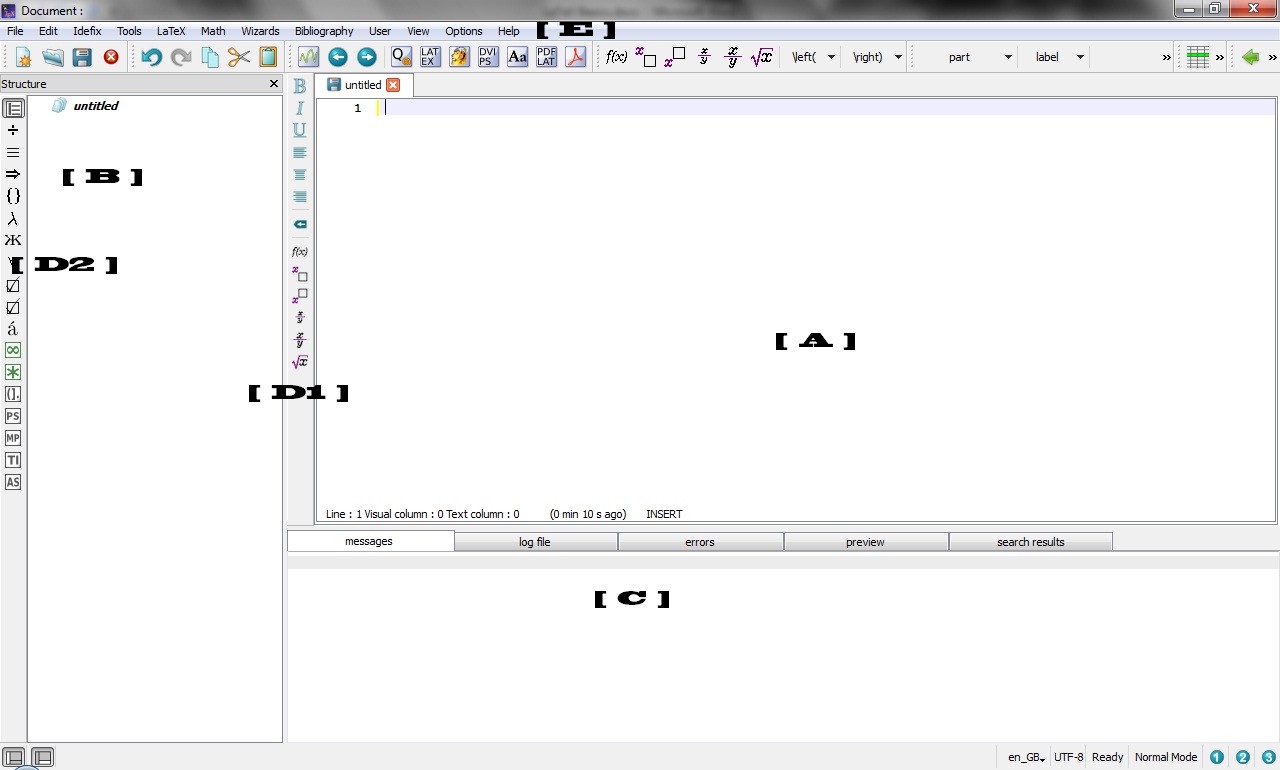
Now you are ready for getting to know about LaTeX. I will start with TeXstudio UI. See Image 1. There is lot of
information I can provide you about this UI. But I will give you some important areas and their functions. I am assuming you are ‘talented’ enough that you can get use to rest of the function later by own. Note that all the minor details are not provided here. You can check original documentation to check such details. I am just providing you working information.
[ A ] is your main working area. Here you have to add your commands as well as document stuff.
[ B ] Is area where you will see your various sections, chapters, labels. These will act like bookmark, so that you can access any part of your document in single click.
[ C ] is not for you 😛 This section is for advance users. Better to ignore for right now.
[ D1] and [ D2] are some shortcuts to regular functions. These are fancy buttons provided in this UI so that you don’t need to remember code/command for every symbol or action.
[ E ] is your menu bar just like MS Word menu bar.
COMMANDS
[This is the section for which you read the entire article written before. Here we go! ]
Beginning
Some of the beginning commands/lines are called ‘Preamble’. These are like settings for layout. Detail layouts and preambles can be found Here. In General you can go for
\documentclass[a4paper,12pt]{article}
This means create layout where paper size will be A4, body font will be 12 and Style will be of Article. Don’t worry about style right now; you can do anything in any layout. These are just standard formats which can save your lots of time (You will understand it later when you actually start working in LaTeX). You can add additional information like Author name/year/Title but this will not display in main document but added to your document attributes.
\documentclass[a4paper,12pt]{article}
\title{LaTeX Basics}
\author{Rohit Suratekar}
After layout setting, there is command you need to add before start your actual document content.
\begin{document}
Now we are ready for your document content. Considering this is a research article, we will start our document with Title.
Title and Headings
Now you will need to know about sections. These are main parts of your articles. Every research article may have sections like Introduction, Method, Observations, Results etc. When you start any section in LaTeX, it will automatically Bold and its font will increase than that of our body font. You can add subsections or subsubsections. Latex will automatically number them for you.
Generally you can start section like
\section{Introduction}
You can add any section/subsection anywhere. No need to worry about numbering. It will be added automatically.
But what if you don’t need numbering for you section? There is option. Just add asterisk ‘*’ before section name.
\section*{Introduction}
This will create Heading without numbering. So you can create your title with above command.
This will align your test to left by default. If you need your Title at Center use following.
\begin{center}
\section*{LaTeX Basics}
\end{center}
Further details about sections and their formatting can be found Here.
One of the important advantages of sections is that you can access any section any time with single click. These sections will be visible in Section [B] (see figure 1).
Body Content
Add your content in each section. There is wide range of good typesetting in LaTeX. You can check them online or in any book. If you want to learn some important and basic settings , I recommend you to read book ‘The Not so short Introduction to LaTeX 2’ by Tobias Oetiker et al. It is simple book of 145 pages. You can learn basics in 2-3 hours. You can find ebook on internet.
Reference, Citation and Bibliography
According to me, this is the most important advantage of LaTeX. It gives you too much flexibility and ease towards citation management. Only one concept you need to understand is ‘Key’. Every reference or bibliographic item is identified with unique ‘Key’. You have to assign it to every item. It can be number, word or combination. So every time you need to cite any information in article, just use this ‘Key’. LateX will take care of rest. Detailed steps can be read Here. You can go to bottom of document and write following code. . .
\begin{thebibliography}{1}
\bibitem{rohit2012} ``LaTeX Basics'', WordPress Journal , 2nd edition
Rohit Suratekar,
Mcgraw Hill  (2012).
\bibitem{book1} ``A Guide to \LaTeX2e: document
preparation for beginners and advanced users'',
Helmut Kopka and Patrick W. Daly, Addison-Wesley (1995).
\bibitem{article3} ``The \LaTeX\ Companion'',
Michel Goossens, Frank Mittelbach and
Alexander Samarin, Addison-Wesley, (1994).
\end{thebibliography}
Here , {1} indicated at first is the argument <widest entry> is the widest label in the list of entries. It helps in alignment. You don’t need to worry about it right now. Second line starts with first item. In that item ‘rohit2012’ is my unique key for reference “ Rohit Suratekar. LateX Basics. WordPress Journal, Mcgraw Hill (2012).”
So anytime I want to cite this reference, I have to add just following command after my sentence/part of article.
\cite{rohit2012}
You can add keylist to add different references at one site.
\cite{rohit2012, article3}
Above command will cite item 1st and 3rd of our bibliography.
You can read more basic tips and formats Here.
Ending
At the end of your document, you need to close by following command
\end{document}
Execution of file
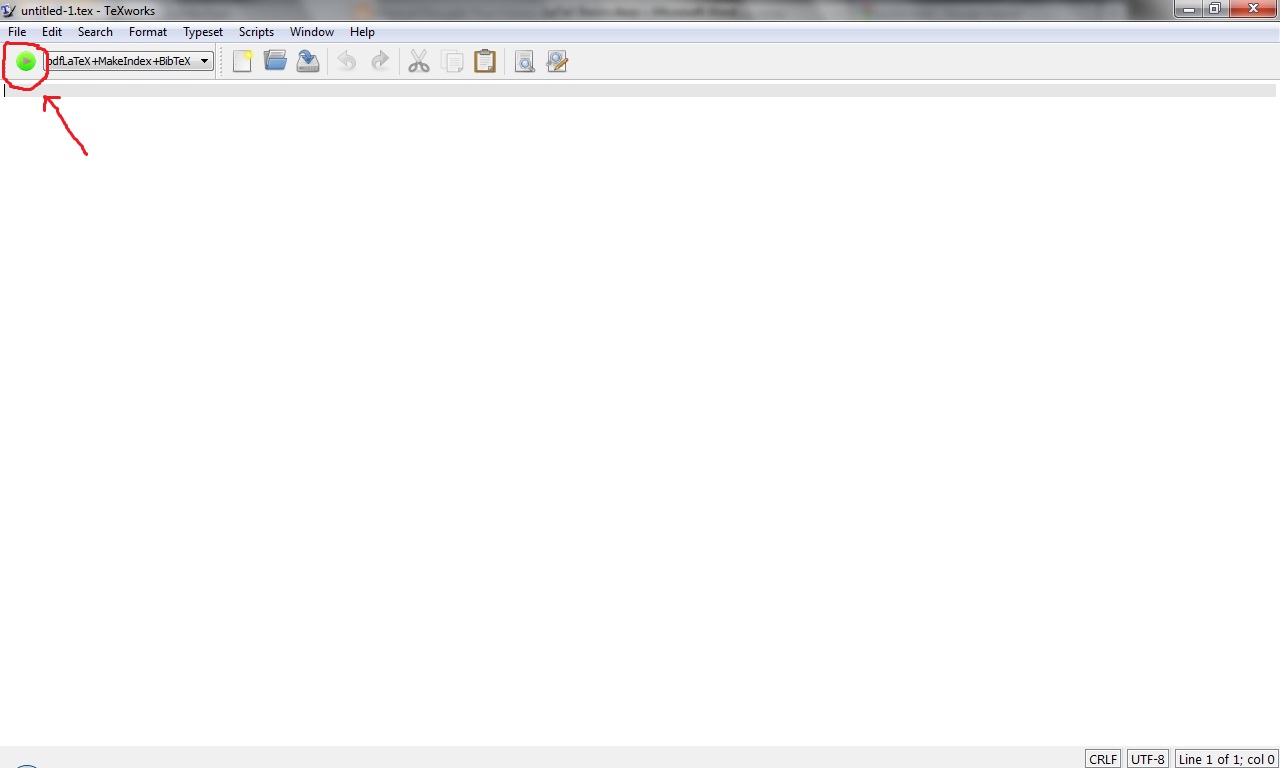 When you are working with LaTeX you will find many different types of files created after saving our document. Well, as a beginner I would like to suggest again don’t go into those details right now. Just one more environment you need to know is ‘TeXworks’. This program will compile your ‘.TeX’ file and will create lots of different types of file. Only file matters to you is .TeX and .PDF. You will get your Pdf output from ‘TeXworks’. Just open this program and import your .TeX file and click on ‘Typeset’ or Ctrl+T or that Green Button. [ See image 2]. Be sure that the typeset is selected as “pdfLatex+ MakeIndex+ BibTeX”. Now don’t ask why we have to select this. You will know after using LaTeX for a while. After clicking on that Green Button, you will see your output PDF file. If there will be any error in your file, It will show there.
ADVANCE TIPS
BibTeX
There is something called BibTeX system for large number of references and citations. Here we import our citations from one external file. Concept is same as above we discussed. Every item has to get unique key. Now creating BibTeX you need to follow specific format for entering your data in your reference file. You can check out these formats Here.
Now what you have to do is just create blank document in your simplest text editors [Like Notepad]. Add your all references in that file with format mentioned in above link. And save your file with extension “.bib” For example, if you want to save your file with name ‘myreference’ save it as ‘myreference.bib’ Now you don’t need to add separate references or citation in your document file. Every new citation or reference, you can add in your ‘.bib’ file with new unique key. And in your Main document just use that key in your citation command. But you need to add some commands in your main code for using this reference file.
At the bottom of your document just add following code
\bibliographystyle{plain}
\bibliography{myreference}
Where ‘myreference’ is the reference file name which you created earlier. You can add multiple files.
\bibliographystyle{plain}
\bibliography{myreference1, myreference2, myreference3}
After saving files just goto TeXworks and typeset your desired file.
Sometimes you will not get your references in your PDF file. In such cases delete all file in your folder with ‘.bbl’ extension and typeset again.
Figures and Charts
These are very delicate elements of your article. Their placement, alignment, size, caption matters a lot. Single bad image can screw your article. I suggest reading Wikibooks on Floats and Tables or read in short Here about these elements.
Multiple Columns
There are many Research journals who demands multi-column article. In such case you can use ‘multicols’ function. Read details about it Here.
Foot Notes
Sometimes you need to add foot notes in your article. It has very simple command
\footnote{Your content here}
Just add this command after word/sentence where you want to give footnote. Add your note in Brackets. Do not worry about numbering. LaTeX will take care of that.
I think this much information is enough for creating your research article. Next time we will discuss about some advance commands and Mathematical typesetting.
— Rohit [DeXteR] Suratekar
REFERENCES
- Oetiker T., Partl, H., Hyna, I., & Schlegl, E. (2003). The Not So Short Introduction to LaTeX 2 (p. 145).
- Abrahams (2003). TEX for the Impatient, (1), 1-391.
External Links [Accessed on 24 June 2012]
- LaTeX [Official ]
- Why LaTeX [Cambridge University Help]
- Latex: Layouts
- Latex Sections
- Wikibooks
- Getting Started with Latex
- Creating Bibliography
- BibTeX and bibliography styles
- Physical Thought
- Creating Figures and Graphs with Latex
- Wikibooks on Floats
Downloading Links [Accessed on 24 June 2012]
Original Post: : https://rohitsuratekar.wordpress.com/2012/06/25/latex-basics-for-newbies/